The short answer
- Close is our pick for a small team that sells by phone and wants the dialer and the record in one product. Close’s pricing includes the Power Dialer on Growth at $99 per user per month billed annually and the Predictive Dialer on Scale at $139, with most outbound calls around $0.02 a minute.
- A standalone dialer makes sense when the CRM stays put. Aircall’s Power Dialer comes with the Professional plan, which Aircall prices at $50 per license per month with a minimum of 3 licenses.
- Kixie dials up to 4 lines at once on its Multi-Line PowerDialer plan. JustCall’s Pro plan includes a power dialer at $49 per user per month billed annually, and PhoneBurner bundles unlimited power dialing with its own CRM from $140 per user per month billed annually.
- Native calling in the other CRMs is one call at a time. Freshsales lists phone on Growth with prepaid credits, HubSpot pools 500 to 12,000 calling minutes a month by tier, and Zoho CRM lists built-in calling from the Standard edition.
Products we checked
Each one has its own page, read against the vendor’s pricing and help pages.
 CloseSales CRM with native calling, email, SMS and plan-dependent Workflows.
 FreshsalesCRM with native calling and plan-dependent sales sequences.
 HubSpotCRM with connected-inbox sequences on eligible subscriptions.
Zoho CRMBroad CRM with low edition prices, built-in calling and Zia AI from Professional.
Compare them
- Close vs Pipedrive: native sales communication or a pipeline with connected calling
- Close vs HubSpot: a focused sales workflow or the existing HubSpot operation
- Close vs Freshsales: compare the complete phone-led sales workflow
- HubSpot alternatives
- Pipedrive vs Freshsales
- HubSpot vs Pipedrive
- Pipedrive alternatives
Four dialing modes, and the team size each one needs
A click-to-call dialer saves keystrokes. A power dialer calls the next lead the moment a call ends, one at a time. A predictive or multi-line dialer calls several numbers at once and connects a rep only when a person answers. An AI voice agent makes the call itself.
Close’s dialing overview describes the first two: the Power Dialer works through a saved Smart View in order, and the Predictive Dialer dials several leads and routes an answered call to an available rep. Close’s predictive guide recommends at least 4 people logged in, calls 10 or more the optimal number, and says a solo caller is unlikely to see call rates above 1x.
| Product | Power dialer | Predictive or multi-line | AI voice agent | Where calls are logged |
|---|---|---|---|---|
| Close | Growth and Scale, from a Smart View | Scale: Predictive Dialer | Chloe Voice Agents on every plan | The lead record in Close |
| Aircall | Professional, in Aircall Workspace, up to 1,000 numbers per list | Sequential only in the documentation we read | AI Voice Agents from $99 a month minimum | Aircall, synced to a connected CRM |
| Kixie | Single-Line PowerDialer plan | Multi-Line PowerDialer, up to 4 lines, with AI Human Voice Detection as an add-on | Not documented on the plans page | A connected CRM through bi-directional integration |
| JustCall | Pro and above | Predictive dialer up to 10 lines in the SalesPro suite | AI Voice Agent add-on | A connected CRM; the page counts 100+ integrations |
| PhoneBurner | Every plan, unlimited | Not listed on the pricing page | Not listed on the pricing page | PhoneBurner’s own CRM or a connected one |
| Freshsales | Not documented; phone on Growth with prepaid credits | Not documented | Freddy AI Agent add-on is a chat agent, $49 per 100 sessions | Freshsales records |
| HubSpot | Not documented; calling from the record with pooled minutes | Not documented | Not documented in the pages we read | HubSpot records |
| Zoho CRM | Not documented; built-in calling from Standard with usage charges | Not documented | Not documented in the pages we read | Zoho CRM records |
Source: Close: plans, pricing and AI credits, Close: power and predictive dialing, Close: Chloe, Aircall: using the Power Dialer in Aircall Workspace, Aircall: pricing and plans, Kixie: plans, Kixie: power dialer software, JustCall: pricing, PhoneBurner: pricing, Freshsales: pricing and plans, Freshsales: Adding or recharging phone credits, HubSpot: product and services catalog, HubSpot: manage call settings and preferences, Zoho CRM: pricing and editions, Zoho CRM: Configuring built-in telephony
Our pick: Close, because the list, the dialer and the record are one screen
Close is a sales CRM with calling, email and SMS built in; the dialer is a button on a saved list of leads. For a small outbound team that is the whole case: no export to a dialer, no sync back, and the call lands on the lead with its recording and outcome.
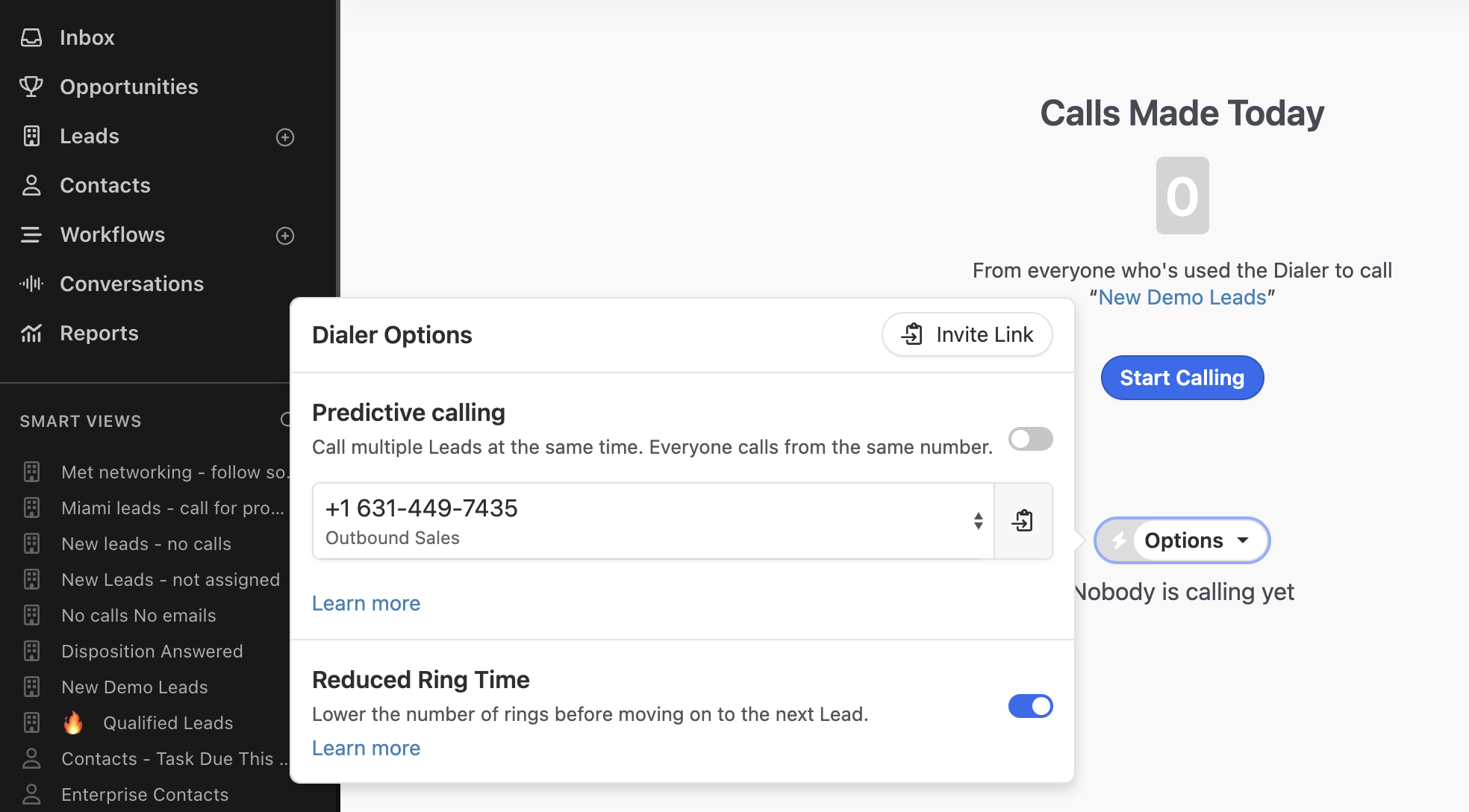
Close’s Power Dialer guide starts a session from any Smart View, checks the list every 5 minutes for leads that enter or leave, and rings each lead for 32 seconds by default or 20 seconds with Reduced Ring Time. The same page notes that Solo, Essentials and legacy Base plans do not include the Power Dialer.
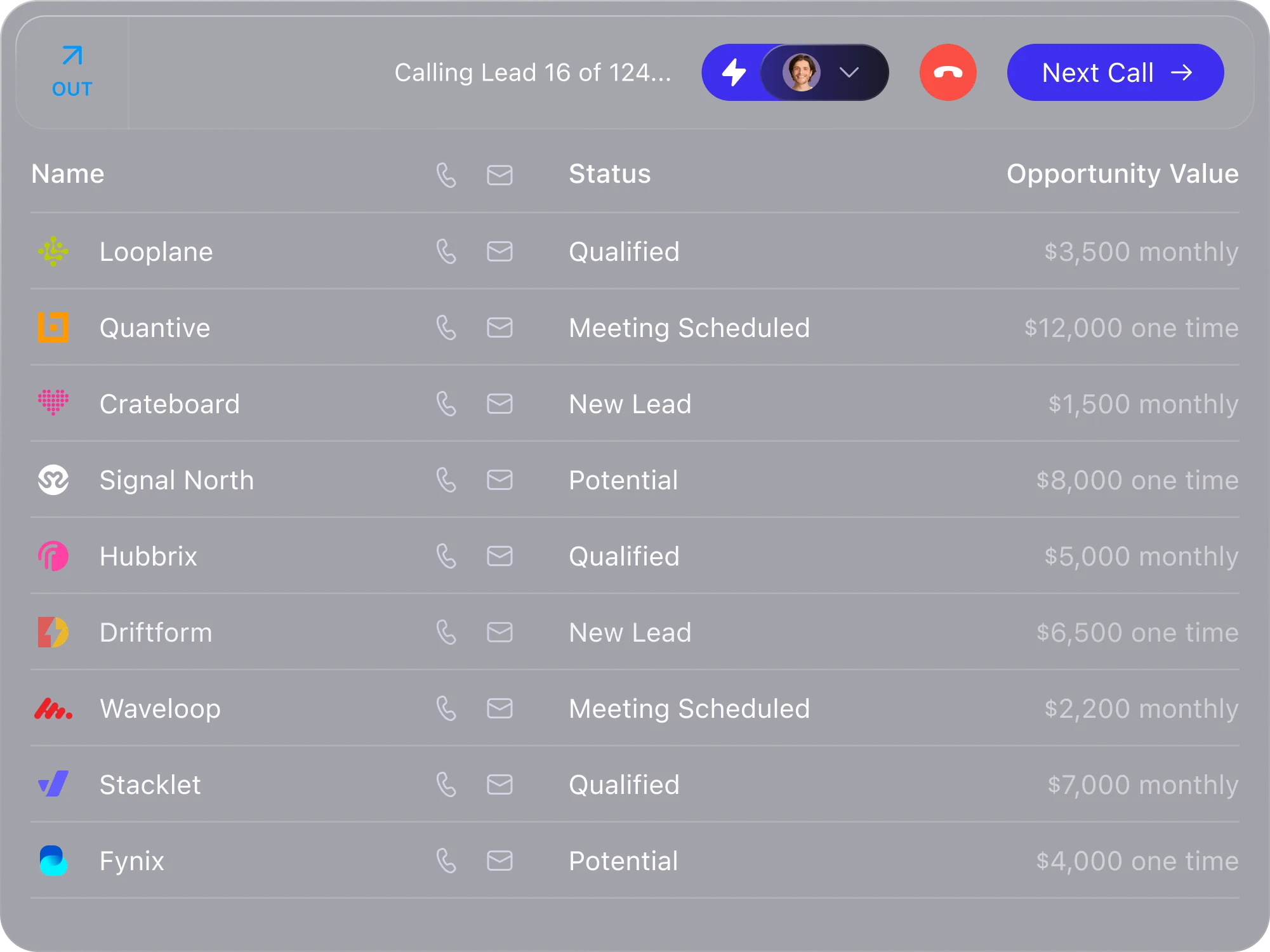
Close’s Predictive Dialer is a Scale feature. It needs a shared caller ID that anyone in the organization can use, and a recorded abandonment message with the company name and a callback number. It skips leads called in the last hour or abandoned in the last 72 hours.
Close offers a paid add-on for call transcripts and summaries. Close’s Call Assistant transcribes and summarizes recorded calls longer than 30 seconds for $50 a month plus $0.02 per minute, and Close’s pricing keeps call recordings for 30 days on Essentials, 90 days on Growth and without limit on Scale.
Close also charges for calling and phone numbers. Close’s usage page charges calls per minute at Twilio pay-as-you-go rates, rounded up to the minute, and rents numbers monthly. Close’s pricing says most outbound calls cost around $0.02 per minute and numbers start at about $1 a month.
Chloe can make calls without a rep. Close’s three-ways article positions Chloe for calls that should happen without a person: first-touch qualification of inbound leads within minutes, at any hour. Close’s Chloe guide limits her to outbound calls, English and numbers in the United States and Canada.
Standalone dialers: what you add, and what you give up
A standalone dialer earns its place when the CRM is fixed or when a feature such as multi-line dialing matters more than a single record. The cost is a second subscription and a sync to maintain.
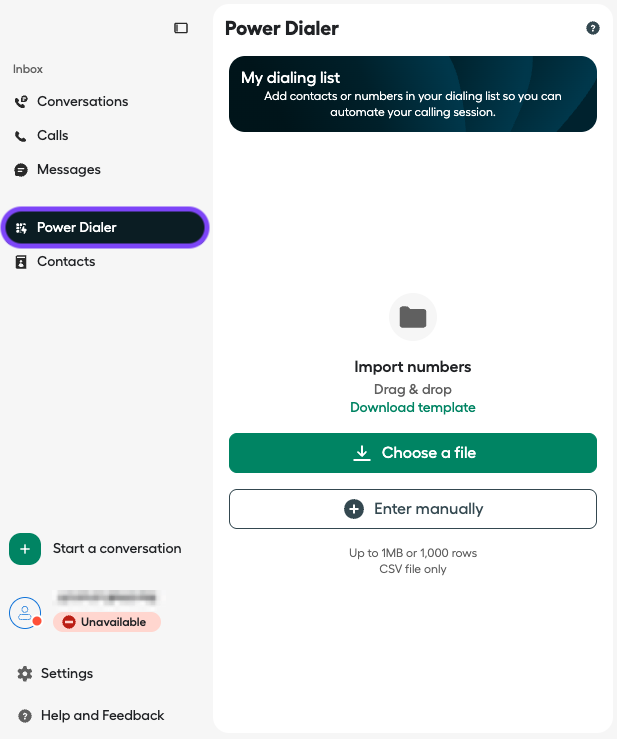
Aircall’s pricing lists Essentials at $30 and Professional at $50 per license per month, with a minimum of 3 licenses, a 25% discount for annual billing and $6 a month for each additional number. Aircall’s Power Dialer is a Professional feature that imports up to 1,000 numbers from a CSV of up to 1 MB and dials them in sequence, in the desktop and web Workspace only.
Kixie’s plans page shows three tiers without prices: Professional, Single-Line PowerDialer, and Multi-Line PowerDialer, which dials up to 4 lines with AI Human Voice Detection as a premium add-on. All three include unlimited US and Canada minutes and a 7-day trial. Kixie’s power dialer page names HubSpot, Salesforce, Zoho, Pipedrive and Close among the CRMs it connects to.
JustCall’s pricing lists Team at $29, Pro at $49 and Pro Plus at $89 per user per month billed annually, each with a minimum of 2 licenses. The power dialer starts at Pro, and the SalesPro suite adds a predictive dialer of up to 10 lines on a custom quote.
PhoneBurner’s pricing is the dialer-first model: Standard at $140, Professional at $165 and Premium at $183 per user per month billed annually. Every PhoneBurner tier includes unlimited power dialing and a built-in CRM, and Premium adds call transcription with an AI note-taker.
Native calling in the other CRMs
Freshsales’ pricing lists phone on Growth at $9 per user per month billed annually, and Freshsales’ phone credits page says calls are paid from prepaid credits that must be in balance before anyone can call.
HubSpot’s catalog includes 500 calling minutes a month on Starter, 3,000 on Professional and 12,000 on Enterprise, pooled across the account. HubSpot’s call settings guide requires a Sales or Service seat to transcribe calls and a Professional or Enterprise subscription to add minutes.
Zoho CRM’s pricing lists built-in calling from the Standard edition, and Zoho CRM’s telephony guide says the built-in telephony works without an external provider and charges numbers monthly.
None of these three documents a power or predictive dialer in the pages we read. A team on one of them that wants list-based dialing is the standalone dialers’ customer, or a candidate to move the record to Close.
Run the same calling day in each candidate
- Build the list. Save a view of leads with the same filters in each product. In Close that is a Smart View, which Close’s Power Dialer guide dials in order and re-checks as leads enter and leave.
- Dial for an hour. Count connects, voicemails and the seconds between calls. Note whether the next call started by itself and whether the rep had to leave the record to dial.
- Check the record. Open a handful of the leads afterward. The call, its recording and the outcome should be on the lead without anyone typing them in.
- Price the hour. Multiply the minutes by the per-minute rate, add numbers and seats, and compare the total with a standalone dialer seat plus the CRM seat.
Watch the vendor walkthroughs
These are vendor-published walkthroughs. They illustrate the product; they are not our independent tests. Use the written analysis and current documentation to check plans and availability.
Sales Calling: Power Dialer, Predictive Dialer & AI | Close CRM
Getting Started with Calling in Close | How to Make and Track Sales Calls
Common questions
What is the best CRM with a built-in power dialer?
For a small sales team, Close. Close’s pricing includes the Power Dialer on Growth at $99 per user per month billed annually and the Predictive Dialer on Scale at $139, and Close’s Power Dialer guide runs sessions straight from a saved Smart View.
Does Close have a predictive dialer?
Yes, on the Scale plan, per Close’s pricing. Close’s predictive guide recommends at least 4 reps logged in and calls 10 or more the optimal number, because the dialer only pays off when answered calls have someone to go to.
What is the difference between a power dialer and a predictive dialer?
Close’s dialing overview puts it plainly: a power dialer dials the next number right after a call is completed, one at a time, while a predictive dialer dials multiple numbers simultaneously and routes an available rep when a human answers.
How much does Aircall’s power dialer cost?
It comes with the Professional plan, which Aircall’s pricing lists at $50 per license per month with a minimum of 3 licenses and a 25% discount on annual billing. Aircall’s Power Dialer article confirms the plan and the 1,000-number list limit.
Can an AI agent make my sales calls?
Inside a CRM, Close’s Chloe does: Voice Agents place outbound calls to United States and Canadian numbers in English and log transcripts to the lead. As phone-system products, Aircall sells AI Voice Agents from $99 a month minimum and JustCall lists an AI Voice Agent add-on.
Sources and scope
This guide is based on the linked vendor documentation and pricing pages, checked November 8, 2026, and on the vendors’ own videos. We have not tested the products hands-on.
Recommendations are editorial judgments about documented fit. Prices are USD list prices; per-minute rates, number fees and plan contents change, so confirm them with the vendor before buying.
Sponsorship never changes this page. How we research.
Sources
- Close: plans, pricing and AI credits
Checked 2026-11-08. Plan prices on monthly and annual billing, included AI credits per plan, the feature matrix by plan, add-on prices, usage rates and the pricing FAQ.
- Aircall: using the Power Dialer in Aircall Workspace
Checked 2026-11-08. Plan availability, where the Power Dialer runs, list limits and import rules.
- Aircall: pricing and plans
Checked 2026-11-08. Essentials and Professional prices per license, license minimums, annual discount, number pricing, AI Voice Agents minimum and add-ons.
- Kixie: plans
Checked 2026-11-08. The three plans, dialer lines per plan, unlimited US and Canada minutes, add-ons and the trial; the page shows no prices.
- JustCall: pricing
Checked 2026-11-08. Team, Pro, Pro Plus and Business plans, license minimums, which plan includes the power dialer, the SalesPro suite and included numbers.
- PhoneBurner: pricing
Checked 2026-11-08. Plan prices on annual and monthly billing, unlimited power dialing, the included CRM, transcription on Premium and SMS limits.
- Freshsales: pricing and plans
Checked 2026-11-08. Plan prices billed annually, phone on Growth, sales sequences on Pro, the Freddy AI Agent add-on and bot session rules.
- HubSpot: product and services catalog
Checked 2026-11-08. Seat prices by tier, included HubSpot Credits, onboarding fees and included calling minutes.
- Zoho CRM: pricing and editions
Checked 2026-11-08. Which edition lists built-in calling, AI agents and extended Zia capabilities; prices come from the editions comparison.
- Close: power and predictive dialing
Checked 2026-11-08. How the Power Dialer and the Predictive Dialer work; customer quotes on the page are vendor testimonials, not our findings.
- Close: using the Predictive Dialer
Checked 2026-11-08. Scale plan requirement, caller ID and abandonment message setup, team-size guidance, skipped leads and limitations.
- Close: Chloe
Checked 2026-11-08. What Chloe does (Voice Agents, Chloe Chat), what she is not, credits and telephony charges, beta status of Chat and the current limitations.
- Kixie: power dialer software
Checked 2026-11-08. Multi-line dialing, AI Human Voice Detection, CRM logging and the CRM integrations listed; vendor marketing page.
- Freshsales: Adding or recharging phone credits
Checked 2026-11-02. Freshcaller prepaid credits and charges.
- HubSpot: manage call settings and preferences
Checked 2026-11-08. Pooled calling minutes, the subscription needed to add minutes, and the seat needed to transcribe calls.
- Zoho CRM: Configuring built-in telephony
Checked 2026-11-02. Explains setup and charges for native calling.
- Close: using the Power Dialer
Checked 2026-11-08. Sessions from a Smart View, plan limitations, list refresh, pausing and resuming, and ring-time settings.
- Close: sales dialer and calling software
Checked 2026-11-08. Vendor description of built-in calling, dialers, voicemail drop, recording and AI summaries; the Power Dialer session image.
- Close: Call Assistant
Checked 2026-11-08. Transcripts and summaries for recorded calls over 30 seconds, the add-on price, languages, searchable transcripts, retention after recordings expire and the processing partner.
- Close: variable usage costs for calling, SMS, numbers and AI tools
Checked 2026-11-08. Per-minute calling at Twilio rates, number rentals, SMS and MMS units and rates, A2P registration fees, Call Assistant and Enrichment usage charges.
- Close: three ways to call in Close
Checked 2026-11-08. How Close positions the Power Dialer, the Predictive Dialer and Chloe, and which team each suits; vendor blog.
- Close: Sales Calling: Power Dialer, Predictive Dialer & AI
Checked 2026-11-08. Official Close YouTube video; publisher confirmed by YouTube oEmbed and the watch page. Vendor illustration, not independent testing.
- Close: Getting Started with Calling in Close
Checked 2026-11-08. Official Close YouTube video; publisher confirmed by YouTube oEmbed and the watch page. Vendor illustration, not independent testing.
Images in this guide
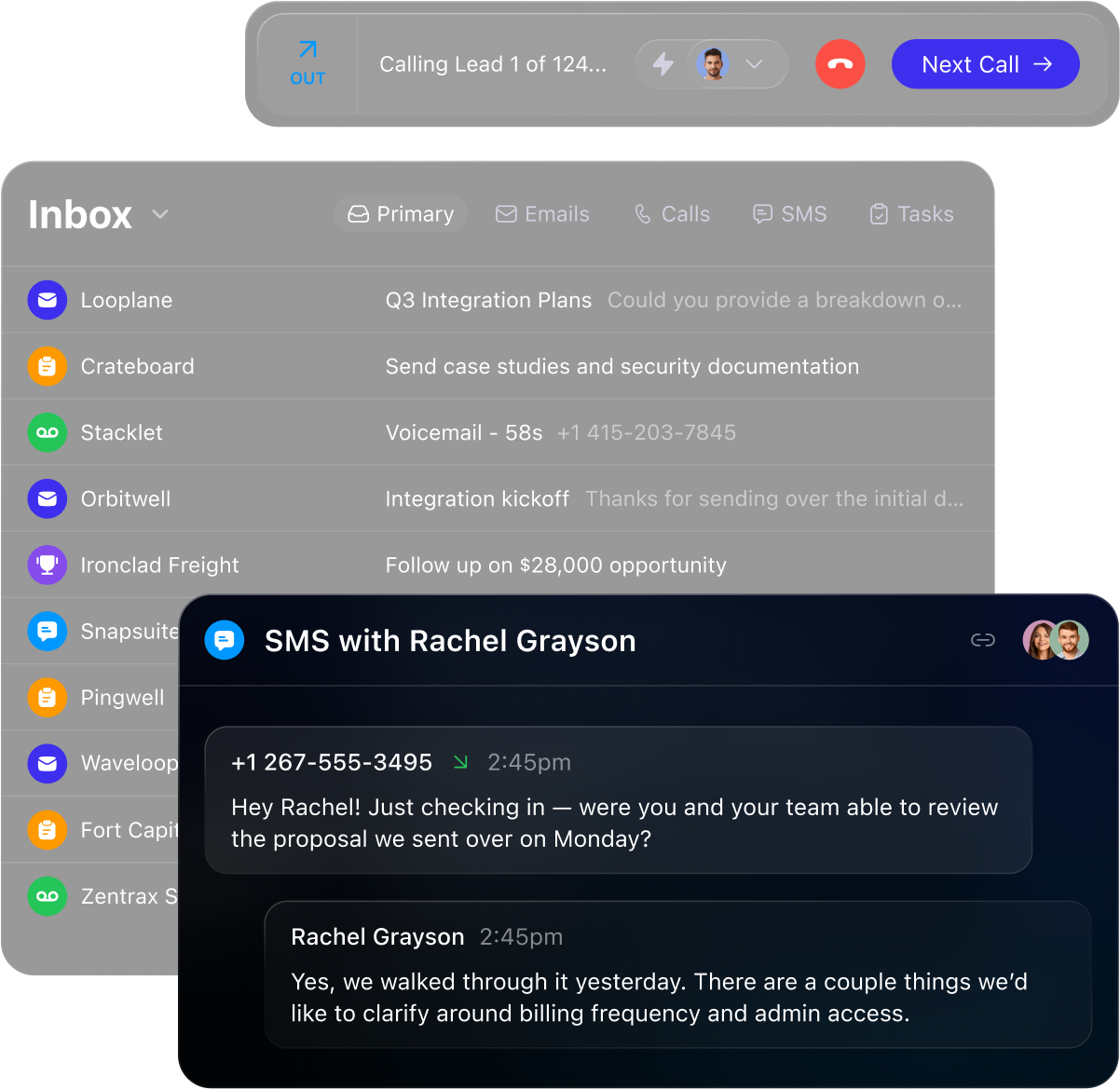
- Power Dialer session bar calling lead 16 of 124 above a lead list with statuses and opportunity values (vendor marketing image)
Close’s own image from close.com, fetched November 8, 2026. Figures in it are the vendor’s examples, not our results.
- Dialer Options panel on a Smart View with the Predictive calling toggle, the outbound number, Reduced Ring Time and the Start Calling button
Close’s own image from help.close.com, fetched November 8, 2026. Figures in it are the vendor’s examples, not our results.
- Aircall Workspace Power Dialer with the dialing-list import screen, up to 1 MB or 1,000 rows of CSV
Aircall’s own image from support.aircall.io, fetched November 8, 2026. Figures in it are the vendor’s examples, not our results.