
Key facts
Best fit: AgencyAnalytics fits agencies that deliver repeatable branded reports and want a client-facing dashboard or portal.
Weaker fit: Teams whose main job is moving raw data into a warehouse, maintaining a complex data model, or staying inside an existing spreadsheet.
- Billing unit
- A Client is a tracked website or URL, so one customer can need more than one Client record.
- Scheduled reports
- Automated emails link to a live web report and do not attach a PDF; recipients can download one.
- Multi-factor authentication
- Email-code challenge; enabling it by default does not cover existing users.
What AgencyAnalytics is and who it suits
AgencyAnalytics is a marketing reporting platform organized around agency clients. Its vendor describes connected marketing data, dashboards, scheduled reports, a branded client portal, and tools such as goals and alerts. Check whether it can replace enough recurring reporting work to justify another workspace.
Start here if your agency prepares repeatable reports for several clients, wants a common template, or needs a branded place for clients to see results. It is a less obvious fit if the main job is moving raw data into a warehouse, maintaining a complex data model, or working entirely in an existing spreadsheet. Those teams should test the specific extraction and transformation they need alongside a connector-focused alternative.
Use the trial checklist to test your reporting workflow. We checked the vendor documentation on October 29, 2026; capabilities and prices can change.
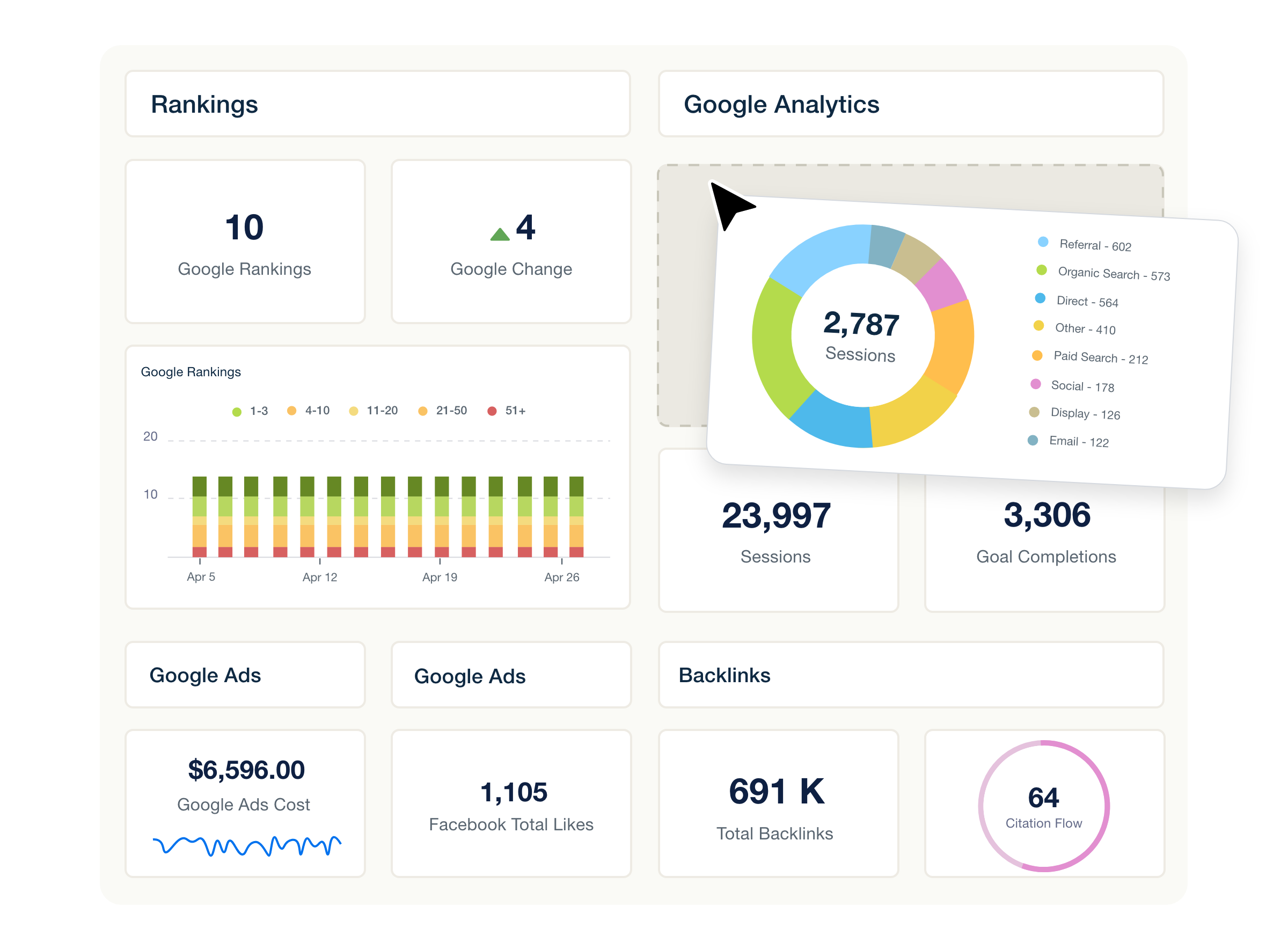
AgencyAnalytics’ dashboard builder illustration uses sample metrics, not actual client performance. The current interface may differ.
Source: AgencyAnalytics custom marketing dashboards. Checked 2026-10-29. Vendor-provided image. Open full-size image.
- Dashboard builder The vendor illustrates arranging reporting widgets in a client dashboard.
- Sample metrics The numbers shown are examples, not measured customer results.
How the reporting workflow fits together
A Client is the workspace for integrations and dashboards. It also holds reports. AgencyAnalytics describes a Client as a tracked website or URL. One customer may need multiple Client records, for example when it has multiple websites or business profiles. Conversely, do not assume every location must become a separate Client: ask how the specific integration and reporting structure handle your situation. Client documentation.
A typical setup is to create a Client, connect authorized sources, build a dashboard for ongoing access, and create a report for delivery. Reports can start blank, from an AgencyAnalytics or custom template, from a smart report based on connected integrations, or by cloning an existing Client’s report. The vendor supports document and slide-deck formats. Report setup guide.
In practice, compare the time spent setting up the first client with the time spent onboarding the second. A reusable template helps only if your team can adapt account and metric differences without repairing it each month. Check commentary and permissions too.
From connected accounts to a client report
A typical reporting path, based on vendor documentation. Details depend on the integration and permissions, as well as your plan.
- Create a ClientSet up the Client record for the website or account you report on.
- Connect sourcesAuthorize the relevant marketing accounts and check the required permissions.
- Build a reportStart from a template or a blank report. You can also clone a report, then add metrics and commentary.
- Review and deliverSchedule a web report, with approval if enabled, or share a link. A recipient can download a PDF snapshot.
A practical outline of the documented workflow, not a timed test. Automatic report emails link to a web report; they do not attach a PDF.
Sources: Create, Customize, and Send Reports, Send, Schedule, and Approve Reports, Report FAQ. Checked 2026-10-29.
Pricing: count Client records
On October 29, 2026, the public USD pricing page displayed the core plan at $20 per Client per month, billed annually, and stated a 20% annual saving. Its Client FAQ uses $25 per Client per month as a monthly-billing example. You can start with one Client and try the core plan for 14 days without a credit card. Agencies with 25 or more Clients can ask about volume pricing. The page says that includes database connectors and dedicated onboarding, plus priority support. Currency and regional availability can differ; confirm the actual quote and renewal terms before buying. Client FAQ.
As an illustration, ten billable Clients at the displayed annual rate are $200 per month equivalent, or $2,400 for twelve months, before taxes, add-ons, or any negotiated terms. This calculation uses the displayed rate. If ten customers need twelve Client records, price twelve records instead.
| Cost or limit | What the vendor documents | What to ask |
|---|---|---|
| Core subscription | Per Client; the public core page lists unlimited data sources and reports, plus dashboards and staff accounts. | Which Clients count for our account, and which features and limits apply to our contract? |
| Adding or removing Clients | Adding a slot during a billing interval is prorated. Reducing the count creates an account credit; deleting a Client alone does not reduce the subscription count. | Who adjusts slots, when does the credit apply, and how are restored Clients charged? |
| Optional tracking | AI Tracker and Rank Tracker are separate add-ons. The annual display was $20.83/month for 250 AI credits and $41.67/month for 500 tracked keywords. | What volume do we need, how are credits consumed, and what is the actual billed amount? |
| Upstream software | Some integrations depend on a separate vendor account or API allowance. | Will our source plan and API limits add cost or restrict access? |
AgencyAnalytics says subscription changes take effect immediately and that a reduction’s difference becomes credit for future charges, rather than an automatic cash refund. Its AI Tracker trial becomes a paid add-on after 14 days unless canceled; do not assume the core trial and each add-on trial have the same payment rules. Billing guide; AI Tracker guide.
How the core subscription scales
Illustrative USD cost at the displayed annual rate
Annual billing; $20 per Client slot per month equivalent, with a one-year commitment.
| Client slots | Monthly equivalent | Annual total |
|---|---|---|
| 1 | $20 | $240 |
| 5 | $100 | $1,200 |
| 10 | $200 | $2,400 |
| 20 | $400 | $4,800 |
One customer may require more than one AgencyAnalytics Client record. These scenarios count billable Client slots, not necessarily customer businesses.
Illustrations use the public $20 per Client per month annual rate checked October 29, 2026. Annual totals are 12 times the monthly equivalent; they are not vendor quotes. The illustrations exclude taxes and optional add-ons. They also exclude external subscriptions and negotiated discounts. A one-year commitment applies.
Source: AgencyAnalytics pricing. Checked 2026-10-29.
Integrations: check access and exact fields
The vendor lists more than 90 marketing integrations on its pricing page, spanning advertising and analytics, as well as SEO, social and ecommerce. Check whether the fields and accounts you need are available. Check historical coverage too. The integration requirements index links to individual connection instructions and required credentials.
| Example | Documented dependency | Trial question |
|---|---|---|
| Google Analytics 4 | The connecting person needs Analyst, Editor, or Administrator access without data restrictions, plus direct access to the account and relevant property. | Can our agency connect the actual property without relying on a departing employee’s access? |
| Meta Ads | At least Employee permission on the ad account must be retained; losing it stops data pulls. | What does the report show when access expires, and who is notified? |
| Ahrefs | API access and credits depend on the Ahrefs plan; certain data and requests consume upstream credits. | What will our own Ahrefs allowance cover for the clients and filters we need? |
Sources: GA4 setup, Meta Ads setup, and Ahrefs setup. For each must-have integration, record the source account and its owner. Record required permissions and fields, refresh expectations and who reconnects it. Then reconcile a few metrics against the original platform with matching date ranges and time zones. Match filters, attribution settings and definitions too. The vendor’s data troubleshooting guide explains why access changes and mismatched metric definitions can affect a comparison.
If you need an API: AgencyAnalytics describes operations for Clients and users, plus SSO. It also covers selected keyword and backlink data. The API is not designed to move the platform elsewhere or pull third-party data into it. Extraction is limited to available endpoints; some may be rate-limited without published numerical limits. The API key is available to the account Admin, and the vendor warns that its playground acts on live data. Ask an engineer to test the exact data and operations you need. Read the API guide.
Some integrations support multiple accounts or pages within one Client. The Core documentation describes up to 10 pages per supported integration per Client, with support as the contact for more; this is not a limit of ten integrations in total. Confirm support for each source and how its accounts appear in the widgets you need. Accounts per integration.
Custom metrics can combine fields from different integrations, for example to add ad spend or calculate a ratio, and appear as report or dashboard widgets. The vendor documents a maximum of 15 metrics per formula, no nesting of custom metrics, and a requirement that inputs support historical data or breakdowns. Check the eligible integrations and widgets, then reconcile the formula against your own definitions. A cross-source formula alone does not establish that the product can perform the joins, deduplication, or attribution modeling your team may need. Custom metric documentation.
Dashboards and white labeling
Use a dashboard when a client or account manager needs to return to a view between reporting dates. Use a scheduled report when the agency wants a regular delivery with a particular structure and commentary. AgencyAnalytics says emailed or linked web reports show live data for the selected range, whereas a downloaded PDF is a snapshot. Its report FAQ says automated email delivery does not attach a PDF; recipients can download one from the web report. If an attachment is a contractual requirement, test the full delivery workflow before deciding. Reports guide; Report FAQ.
The scheduling guide describes an optional approval step: at the scheduled time, the reviewer is notified in the app. The reviewer can edit the report, then approve and send it. Test who receives that notification, what happens if a reviewer is away, and whether the delivery time meets your client agreement. Scheduling and approval guide.
The vendor describes logo and color options, a custom login URL and branded reports. Its branding guide says a subscription receives an agency subdomain automatically; using your own domain requires a CNAME, and the service provisions HTTPS. Confirm what is included in the plan you are quoted, and test the login and sender address as a client. Test the report link too rather than assuming every element is branded. White-label guide.
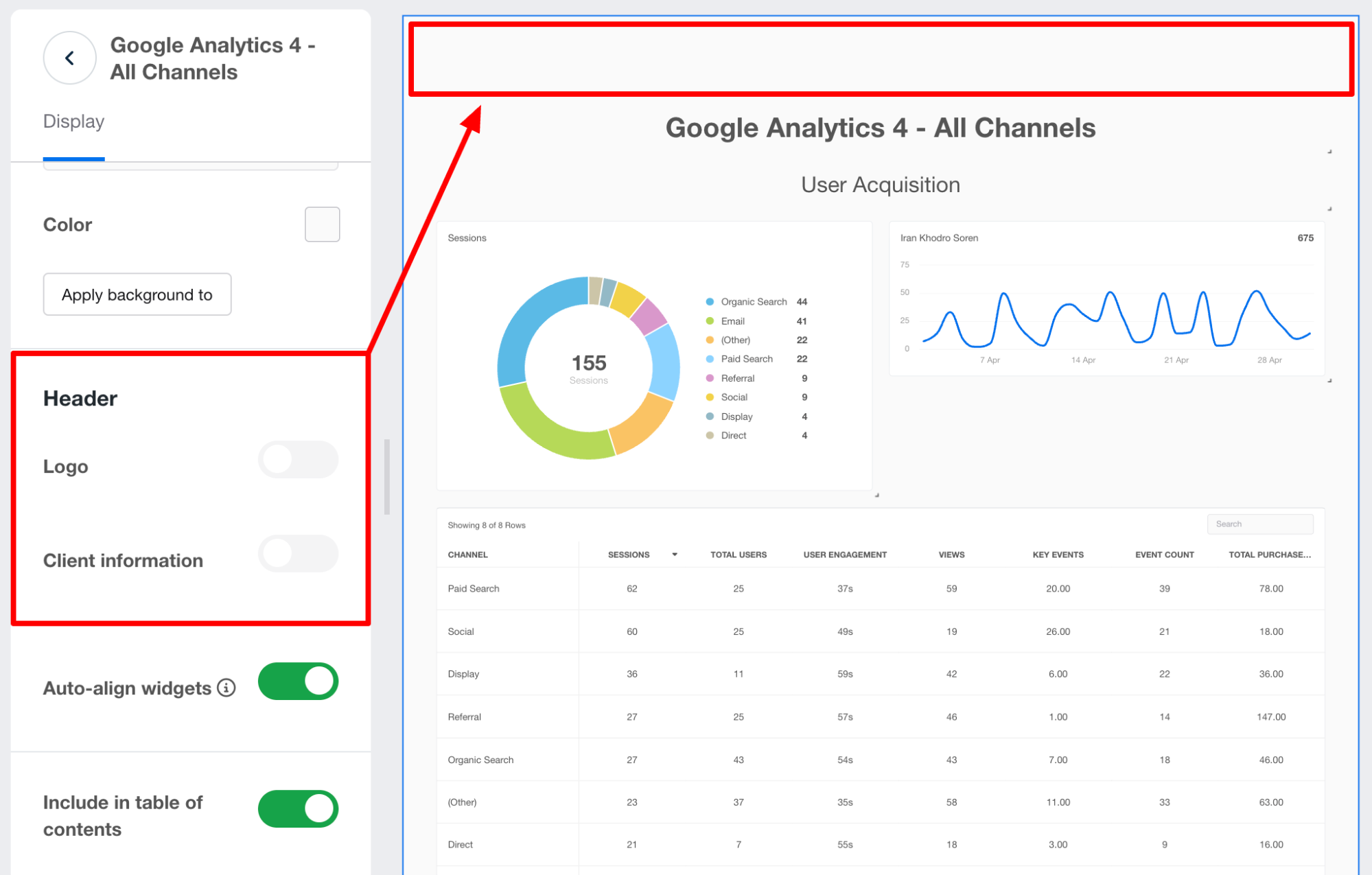
AgencyAnalytics’ help documentation shows report page options beside an example GA4 report. Red highlights are part of the vendor’s original screenshot; the current interface may differ.
Source: AgencyAnalytics: Create, Customize, and Send Reports. Checked 2026-10-29. Vendor-provided image. Open full-size image.
- Header and client information Choose whether the page displays the header logo and client details.
- Layout and contents Set widget auto-alignment and whether the page appears in the report table of contents.
- Report preview The example GA4 report shows how the page can appear with those settings.
Historical data and the limits of an export
History is specific to the integration. For example, the Meta Ads documentation describes 37 months of available data and says its API supplies only partial data for inactive ad campaigns. The Klaviyo guide describes up to five years available from its API, but only 365 days per widget request. The Ahrefs guide says earlier dates are backfilled with the values shown on the connection date, not recovered as true historical observations. Verify the fields and periods that matter to your reports; these examples do not establish history for every connector. Meta Ads; Klaviyo; Ahrefs.
For archived report files, the vendor says historical reports are available for download for 60 days, after which older reports are permanently removed. Save a copy outside the platform if your client or contract requires a longer record. A live web report and a downloaded snapshot serve different purposes. Report FAQ.
AgencyAnalytics documents an admin bulk export of ranking metrics and integration settings. For transfers between AgencyAnalytics accounts, custom dashboards and reports do not transfer; users also do not transfer and must be recreated. This describes a transfer within AgencyAnalytics. Ask the competing vendor what it can import. Open sample exports and list the calculations and schedules you would have to rebuild. List permissions, templates and annotations too. Exports and transfers.
When a Client is deleted, the vendor says restoration within 30 days brings its data back as it was; after 30 days, Warehouse and Time Series fetching starts afresh. Ask for the exact consequences for your integrations and any contractual retention obligations before deleting. Client restoration guide.
For supported integrations, AgencyAnalytics says it fetches data on a schedule and stores it for reporting; some integrations are only partly warehoused. Its documentation lists different initial history windows by integration and notes that older data loads backward in batches, often over several days. The same page describes both growing history for some integrations and limits on older data. Ask support to confirm retention and backfill time for each source and field you rely on. Ask about disconnect behavior; do not assume a single retention period applies everywhere. Data warehousing documentation.
Access and privacy questions
AgencyAnalytics documents one account Admin plus Staff and Client users. Staff access can be restricted to selected Clients, and permissions for Staff and Client users can be customized. Client users need an account for in-app custom dashboards, while an emailed report can be viewed without one. Test a restricted user against two clients and a report link; a branded interface is not itself proof of isolation. User-management guide.
The vendor’s MFA documentation describes an email-code challenge. An Admin can enable it by default for newly created Staff or Client users. The Admin must enable it separately for existing users. Confirm whether email-based MFA meets your security policy and how account recovery and offboarding work. MFA documentation.
The vendor privacy policy says personal data may be transferred and processed in Canada and the United States. It describes retention by purpose and legal need without establishing one fixed period for every type of customer data. Ask the vendor for its current data-processing agreement and subprocessors. Request security reports and breach-notification commitments. Confirm deletion terms and data locations for your contract. We have not independently reviewed a current certification or audit report and do not infer compliance with your obligations from a vendor policy.
For healthcare-related work: AgencyAnalytics states that it is not HIPAA compliant at this time and cannot sign Business Associate Agreements or other legally binding HIPAA contracts. If your proposed use requires a BAA, discuss the data and obligations with your privacy team before proceeding. Read the vendor’s security FAQ.
How to compare the alternatives





Side by side: AgencyAnalytics vs Swydo for a 15-client agency · AgencyAnalytics alternatives
Choose between AgencyAnalytics and DashThis by counting Client records versus dashboards. DashThis plans count dashboards and include a set allowance of data sources. DashThis pricing FAQ. Compare AgencyAnalytics with Supermetrics if you want to feed a spreadsheet or dashboard you already use. For another billing comparison, see AgencyAnalytics vs Swydo. Confirm pricing and permissions with each vendor.
| Starting point | Why compare it | Question to bring to the trial |
|---|---|---|
| AgencyAnalytics | Client-centered reports and dashboards with branded access. | How many Client records does our portfolio need? Which integrations and templates? |
| Swydo | Another client-reporting workflow with a different billing unit: connections are counted by client, while reuse in that client’s reports is allowed. | What happens to cost when the same source is connected under multiple clients? |
| Supermetrics | A useful comparison when the destination is an existing spreadsheet or dashboard and connection access is central to the job. | Can the exact fields and refresh behavior reach our existing report, and who maintains access? |
| Funnel | A data-collection and modeling comparison: the vendor describes standardizing marketing data for reports and measurement, with destinations such as a warehouse. | Which sources and destinations affect the quote? How does data volume affect it, and who maintains the mapping? |
| DashThis | A dashboard-focused comparison with a different documented source-counting rule: a source added to a dashboard counts once even when reused across dashboards. | Which unique sources are added to dashboards, including those without widgets? |
See Swydo’s billing FAQ, Supermetrics’ connection guide, Funnel’s website, and DashThis’ source-usage guide. Include source subscriptions and setup in your comparison. Account for historical reconstruction and ongoing maintenance too.
The agency reporting buying guide maps these products by where reports are delivered and what each subscription counts.
A trial checklist for your agency
Use one representative client and a report your team already delivers. Record what the product actually does with your inputs, what the vendor documents, and what remains unanswered.
- Map your portfolio. Estimate the Client records and source accounts you need. Count users and locations too. Get a written quote for today and a busier quarter.
- Connect the real sources. Confirm who owns the account and its permission level. List required fields and who handles reauthorization.
- Reconcile the data. Match a few important figures to the source. Use the same date range and timezone. Match attribution and filters. Investigate gaps and historical limits.
- Build and reuse. Recreate a report with commentary and save a template. Adapt it for a second client. Note every manual fix.
- Deliver and approve. Run the intended review and schedule; open the client-facing web report and download its PDF. Check whether that meets your delivery and archive requirements.
- Test access and recovery. Sign in as a restricted user, check another client is inaccessible, turn on the available MFA, and ask how a failed connection is surfaced.
- Try the exit. Download exports and an archived report; document which items are editable, portable, or need rebuilding.
Before signing, resolve questions about pricing and add-ons. Check security documentation and support too. Do not treat an integration logo or a vendor demonstration as proof that the complete workflow works for your agency.
Common questions
How much does AgencyAnalytics cost?
On October 29, 2026, the public USD pricing page listed $20 per Client per month billed annually, with a 20% annual saving. The Client FAQ uses $25 per Client per month as a monthly-billing example. Ten Clients at the annual rate is $2,400 a year before taxes and add-ons. Agencies with 25 or more Clients can ask about volume pricing. Based on AgencyAnalytics pricing, checked October 29, 2026.
Does AgencyAnalytics have a free trial?
Yes. The vendor offers a 14-day core trial without a credit card. Add-on trials, such as AI Tracker, have their own rules and become paid after 14 days unless canceled. Based on AgencyAnalytics pricing, checked October 29, 2026.
Does AgencyAnalytics attach a PDF to scheduled report emails?
No. According to the vendor’s report FAQ, automated report emails link to a live web report rather than attaching a PDF. Recipients can download a PDF snapshot from the web report. Based on Report FAQ, checked October 29, 2026.
How long does AgencyAnalytics keep past reports?
The vendor says historical reports are available for download for 60 days, after which they are permanently removed. Save copies elsewhere if a client or contract needs a longer record. Based on Report FAQ, checked October 29, 2026.
Is AgencyAnalytics HIPAA compliant?
No. AgencyAnalytics states that it is not HIPAA compliant at this time and cannot sign Business Associate Agreements. Based on AgencyAnalytics Security and Compliance FAQ, checked October 29, 2026.
Can AgencyAnalytics be white-labeled?
The vendor describes logo and color options, a custom login URL and branded reports. Each subscription gets an agency subdomain; using your own domain requires a CNAME record, and the service provisions HTTPS. Based on White Label Branding Overview, checked October 29, 2026.
How is AgencyAnalytics different from Swydo?
Both are client-reporting workspaces, but they count usage differently. AgencyAnalytics bills per Client record. Swydo counts connections by client and allows reuse within that client’s reports, so the same portfolio can price differently. Based on Swydo billing and data sources, checked October 29, 2026.
Can I move my AgencyAnalytics setup to another tool?
Only partly. An admin can bulk export ranking metrics and integration settings. Custom dashboards and reports do not transfer even between AgencyAnalytics accounts. Users also need to be recreated. Based on Manage Exports and Transfer Clients, checked October 29, 2026.
Sources and scope
We checked the linked vendor pages on October 29, 2026. We have not run the product or independently measured performance, customer satisfaction, or suitability for a particular account. Prices reflect the public USD display and can differ by billing interval, currency, region, contract, or later changes. Confirm current terms directly.
Quillwell also builds Adswell, a paid-media product. That relationship is disclosed because this guide discusses marketing software. No paid placement or affiliate link appears in this guide.
Sources
- AgencyAnalytics pricing
Checked 2026-10-29. Current public USD core offer and included features; volume pricing, add-ons and trial.
- Create and Manage Clients
Checked 2026-10-29. Client definition and setup; count, deletion and restoration.
- Billing and Subscriptions
Checked 2026-10-29. Slot adjustments and proration; account credits and add-on trial rules.
- Available Integrations and Connection Requirements
Checked 2026-10-29. Connection inventory and required credentials.
- Connect Google Analytics
Checked 2026-10-29. GA4 permissions and connection setup.
- Connect and Filter Facebook Ads
Checked 2026-10-29. Meta Ads permissions and 37-month history; partial inactive-campaign data.
- Connect Klaviyo
Checked 2026-10-29. Klaviyo permission and API history and retrieval windows.
- Connect Ahrefs
Checked 2026-10-29. Upstream API credits and caching; historical limitations.
- Create, Customize, and Send Reports
Checked 2026-10-29. Report creation and templates; sharing and branding.
- Send, Schedule, and Approve Reports
Checked 2026-10-29. Scheduling and report approval workflow.
- Report FAQ
Checked 2026-10-29. Web-report delivery and PDF limitation; 60-day historical report window.
- White Label Branding Overview
Checked 2026-10-29. Branding and login URL; HTTPS setup.
- Create and Manage Users
Checked 2026-10-29. Admin and staff roles; client roles and access.
- Multi-Factor Authentication
Checked 2026-10-29. Email-code MFA and treatment of new and existing users.
- Privacy Policy
Checked 2026-10-29. Vendor policy on retention and processing of personal data; international transfer.
- Manage Exports and Transfer Clients
Checked 2026-10-29. Exports and limitations of transfers between AgencyAnalytics accounts.
- Understanding Data Access and Troubleshooting Data Issues
Checked 2026-10-29. Upstream access issues and comparing matching metrics.
- Configure AI Tracker
Checked 2026-10-29. AI Tracker add-on credits and trial; renewal.
- Swydo billing and data sources
Checked 2026-10-29. Swydo source counting for comparison.
- Supermetrics connection guide
Checked 2026-10-29. Data Studio connection workflow for comparison.
- Funnel website
Checked 2026-10-29. Funnel’s own product description, used for comparison.
- DashThis sales and pricing FAQ
Checked 2026-10-29. Dashboard plans and their included data sources.
- DashThis source usage
Checked 2026-10-29. Dashboard source counting for comparison.
- Using the AgencyAnalytics API
Checked 2026-10-29. Available API operations and limitations; key access, live playground and rate-limit caveat.
- AgencyAnalytics Security and Compliance FAQ
Checked 2026-10-29. Vendor statement on HIPAA status and business associate agreements.
- Understanding Accounts Per Integration
Checked 2026-10-29. Supported multi-account connections and Core plan limit per integration per Client.
- Create and Manage Custom Metrics
Checked 2026-10-29. Cross-integration formula capabilities and documented limits.
- Data Warehousing
Checked 2026-10-29. Supported integration storage and history; sync behavior. Retention details require confirmation.
- AgencyAnalytics custom marketing dashboards
Checked 2026-10-29. The asset URL is embedded in AgencyAnalytics’ public custom dashboard page. The vendor presents it as an example of its drag-and-drop dashboard builder.