The short answer
- Check the response allowance, destination mapping and ownership before choosing Typeform.
- Typeform’s response limits apply across forms; its Basic and Plus plans include different allowances and user counts.
- Typeform documents a HubSpot contact handoff. Test matching, mapping and client ownership with synthetic records.
Price the monthly response workload
Typeform’s free plan allows 10 responses per month across all forms. Basic includes 100 monthly responses and one user; Plus includes 1,000 and three users. Limits reset monthly even on annual plans.
Count every form in the organization, seasonal peaks and partial submissions. Typeform’s partial response guide says partial responses count toward the allowance; a partial and final response in separate browser sessions can count twice. Plan the response tier for the actual workload.
Response limits says forms become private at the limit until the next month or an upgrade. Optional auto-upgrade can keep collection open by moving to a higher response tier with additional charges. Decide who may authorize that spending and monitor the allowance.
The pricing page displayed different dollar amounts in separate modules when checked. The free-plan guide says Typeform experiments with plans, so the offer in an account may differ. Confirm the price, billing term and response add-ons before buying.
Test a new and returning lead
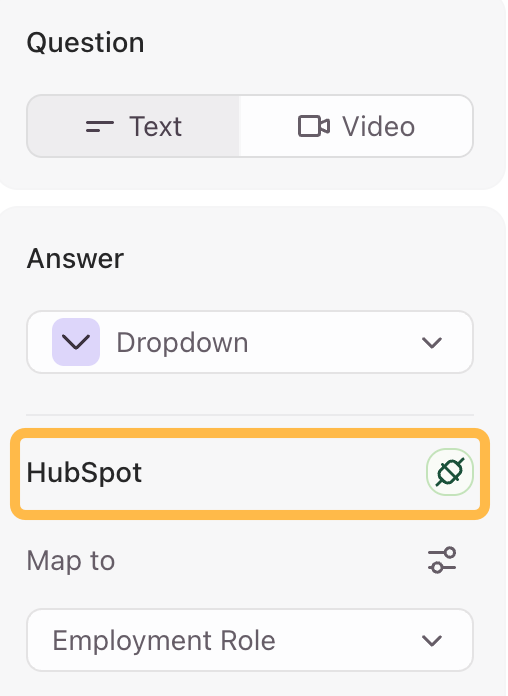
Typeform’s HubSpot integration describes creating or updating contacts and mapping questions to Contacts, Companies and Deals. It lists a free Typeform account as sufficient, but the free-plan guide also lists HubSpot among paid-only integrations. Confirm the entitlement and mapped properties for your account.
Typeform’s troubleshooting guide describes matching an existing contact using a browser cookie or an existing email address. A shared browser can therefore matter to the outcome. Use synthetic records: a new email, an existing email with a changed field, and a different email in the same browser. Inspect the destination for the expected record and values.
Interrupt or disconnect the destination during a test and establish who notices and repairs the failed handoff. A thank-you screen is not proof that the CRM received the intended update.
Treat URL data as visible data
URL parameters, formerly called hidden fields, pass values through a form link. They can support personalization or attribution, but a value in a URL can be seen or changed by whoever has the link. Do not treat a hidden field as authentication or put secrets in it.
Test a link with a synthetic identifier, remove or change it, and check what reaches the form and CRM. Use an appropriate access control for sensitive data and verify the destination independently.
Plan ownership, export and downgrade
Typeform’s move guide says organization owners can move forms to organizations they belong to, and that cross-organization moves change the form URL. Its workspace guide says a Plus plan is required for moving between accounts. The guides differ on plan requirements, so confirm permissions and eligibility before cutover.
Typeform’s move guide says copying a form transfers its structure but excludes results and follow-up messages. Moving it carries existing results. Data portability describes results exports in CSV or Excel. Inspect the archive separately and test the new owner’s working form.
Cancellation guidance says downgrade takes effect after the prepaid period, and existing forms and responses are retained, though forms may close to new responses. A downgrade to a plan without partial responses can close a form using partial submit points, according to the partial-response guide. Review live forms before changing plans.
When to compare alternatives
Consider Tally for free collection subject to fair use, Fillout for documented connected-record updates, or Feathery for rule-driven API intake. The Typeform alternatives guide compares the same buyer jobs. Typeform remains reasonable if its allowance, mapping and workspace terms fit the work.
Common questions
How many responses does Typeform Free include?
Typeform’s free plan lists 10 responses monthly across all forms.
Can Typeform update a HubSpot contact?
Typeform’s integration guide describes creating or updating contacts; test matching and field mapping in your account.
What happens at the response limit?
Typeform says forms become private at the limit unless an upgrade changes the allowance. Optional auto-upgrade has additional costs.
Sources and scope
We read the linked vendor pricing and documentation on November 5, 2026.
We have not tested these products, integrations, account access or migrations. Confirm the current plan, contract and behavior for your organization.
Sponsorship never changes this page. How we research.
Sources
- Typeform plans and pricing
Checked 2026-11-05. Monthly response bases and user counts; rendered prices vary across page modules and billing views.
- Typeform free plan
Checked 2026-11-05. Free allowance and logic.
- Typeform response limits
Checked 2026-11-05. Limits apply across forms and private mode at the limit.
- Typeform response auto-upgrade
Checked 2026-11-05. Optional response-tier auto-upgrade.
- Typeform partial responses
Checked 2026-11-05. Partial submit points, response counting and downgrade implications.
- Typeform HubSpot integration
Checked 2026-11-05. Create or update contacts and map questions.
- Typeform HubSpot troubleshooting
Checked 2026-11-05. Examples of contact matching by cookie or email.
- Typeform URL parameters
Checked 2026-11-05. Passing information in form URLs.
- Copy or move Typeform forms
Checked 2026-11-05. Movement between organizations and workspaces.
- Typeform workspaces
Checked 2026-11-05. Workspace movement and plan and ownership conditions.
- Typeform data portability
Checked 2026-11-05. Response export formats.
- Cancel a Typeform paid account
Checked 2026-11-05. Downgrade timing, retention and possible form closure.
Images in the header
- A HubSpot property mapping control in a form
Typeform's own image from help.typeform.com, fetched November 5, 2026. Figures in it are the vendor's examples, not our results.