The short answer
- Buffer is worth considering when channel-based pricing and a straightforward draft-to-queue workflow fit the team.
- Buffer pricing lists Free for three channels and one user; Team includes unlimited members and approval workflows.
- Buffer's draft guide says owners and Full Access users can move drafts to the queue. Choose client and agency permissions accordingly.
Count channels and choose the plan
Buffer pricing lists Free for up to three channels, one user and ten scheduled posts per channel. Essentials includes one user; Team includes unlimited team members and approval workflows.
Buffer pricing displays Essentials at $5 per month equivalent for each of the first ten channels on annual billing. Team is $10 per channel per month equivalent for that same range. For one channel, the displayed yearly totals are $60 and $120 respectively. Five Team channels at that rate imply $50 monthly equivalent and $600 per year before taxes or other charges. Buffer’s pricing guide lists lower marginal rates above ten channels. Confirm the checkout total, currency and billing terms.
Count each connected channel, including separate client profiles, rather than counting only clients. Estimate channels at the busiest point of the contract and check how additions or removals affect the current invoice. Unlimited members does not mean unlimited channels are free.
Choose who can move a draft to the queue
Buffer's draft guide says Needs Approval users can edit and request approval on their own drafts. Owners and Full Access users can edit, delete and move drafts to the queue, including a draft whose author has not requested approval. Approval of drafts is a Team feature.
Buffer’s draft guide also says Full Access users cannot request approval on their own drafts. Decide who will prepare content if a separate reviewer must receive a formal request.
Buffer's agency guide suggests giving staff Requires Approval and clients Full Posting access for the relevant channel when clients approve. That client role also permits publishing and editing. Check whether the client is comfortable with those rights and who else has Full Access.
With a private dummy post, try to queue it as a restricted writer, then as an agency Full Access user before the client approves. Request approval and inspect the version and schedule after the client acts. Agree on an exception process; the role model alone does not make the client the sole possible approver.
Set client boundaries before connecting
Buffer organizations let an invited user switch into a shared organization using their own login. Access to an individual channel depends on the permissions granted there; Buffer's team guide also distinguishes Publish and Community access.
Buffer's agency guide says a client connecting their own channels in the agency organization needs Admin access. Admins can manage any connected channel and access billing settings. That may expose other clients' information. Decide who connects channels and whether separate client organizations are appropriate, then price each actual arrangement.
The same guide says the organization owner always has Full Posting access to all channels. Identify the owner, client and agency administrators and document who can reconnect accounts, adjust permissions and pay the bill. Buffer notes that social access tokens can expire and require reconnection.
How to compare the alternatives
Consider Hootsuite when its shared inbox, reporting and per-user pricing fit the portfolio. Hootsuite lists account limits by plan and per-user seats; its approval setup is documented for Advanced and Enterprise.
Consider Planable if required sign-off and a configurable post lock are central. Use the social publishing and approvals guide to test the same writer, client, administrator and overdue post across candidates.
Other social publishing and approvals we checked
 SendibleSocial publishing with approval tasks and client workspaces.
Investigate when many reviewers need access.
 SocialPilotSocial publishing with client approval and role-based workflows.
Consider Premium for its client approval workflow.
Common questions
How does Buffer charge?
Buffer’s pricing guide lists annual rates equivalent to $5 per month for Essentials and $10 for Team for each of the first ten channels. Marginal rates decrease above ten channels; confirm your checkout.
Does Buffer charge per reviewer?
Buffer lists unlimited team members on Team. Count connected channels and confirm the complete quote.
Can a Buffer client approve without publishing rights?
Buffer’s agency guide describes client approval using Full Posting access, which also allows posting. Confirm whether another role meets your requirements.
Sources and scope
We read the linked vendor pricing and documentation on November 5, 2026.
We have not tested these products, connected accounts or published content. Confirm current terms and reproduce the workflow with your own roles.
Inclusion and corrections are free; sponsorship does not determine our conclusions. Editorial order is independent of paid placements.
Sponsorship never changes this page. How we research.
Sources
- Buffer: pricing
Checked 2026-11-05. Plan, channel, user and approval allowances on the displayed annual billing option.
- Buffer: Adding users and setting up permissions
Checked 2026-11-05. Organization and channel permissions and Team plan.
- Buffer: Managing and approving draft posts
Checked 2026-11-05. Draft, approval and queue permissions.
- Buffer: Using Buffer as an agency
Checked 2026-11-05. Client channel connections, administrator access and review roles.
- Buffer: Getting started as a user in an organization
Checked 2026-11-05. Organization membership and invited users.
- Buffer: Connecting your channels to Buffer
Checked 2026-11-05. Channel permissions and reconnection.
- Hootsuite: plans and pricing
Checked 2026-11-05. Plan pricing presentation, seats, account limits and features.
- Hootsuite: Set up an approval process
Checked 2026-11-05. Approval permissions and sequential or parallel stages.
Images in the header
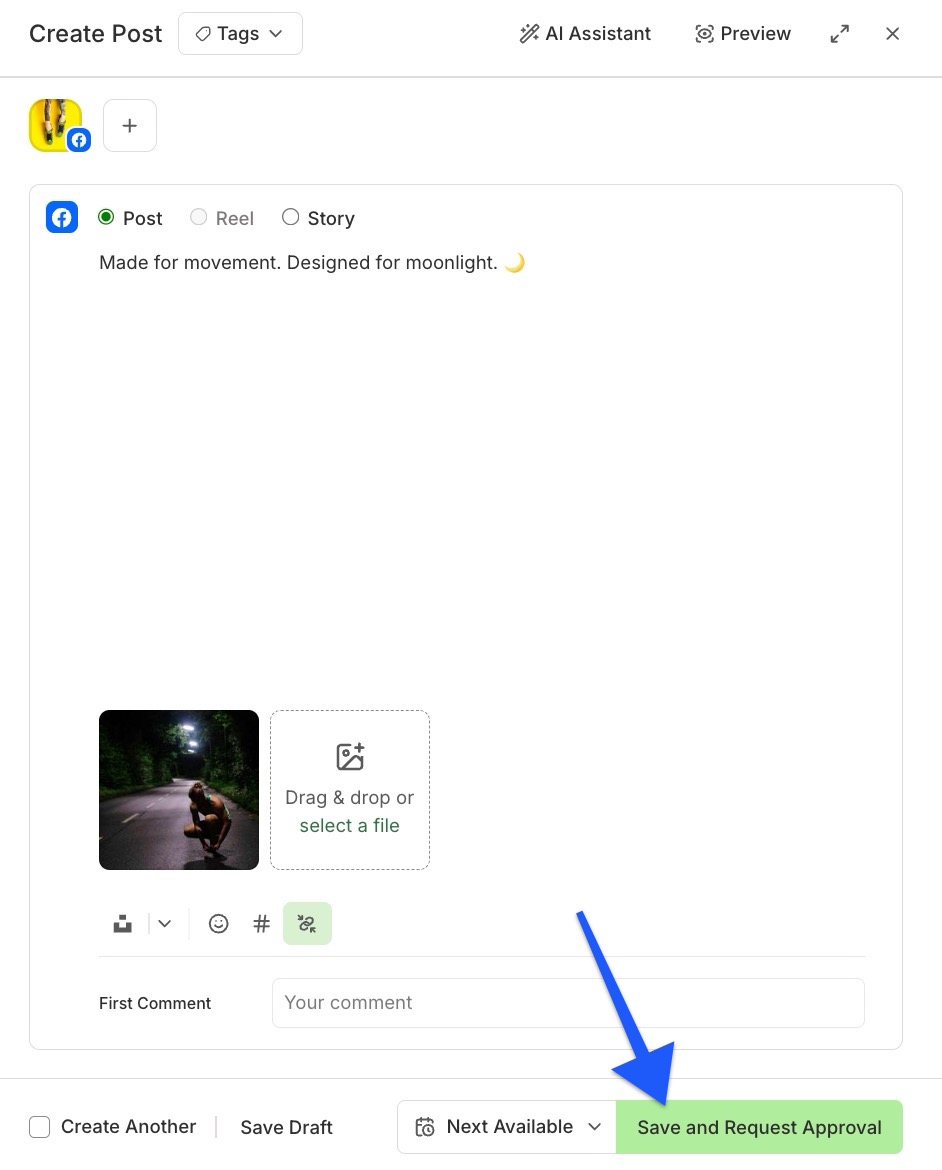
- A draft composer with a request-approval action
Buffer's own image from support.buffer.com, fetched November 5, 2026. Figures in it are the vendor's examples, not our results.